Passport Photo Maker
Make a passport or visa photo at home in a few minutes. Choose your document, add a photo, and the tool sizes your head to the official rules, swaps the background for white or light grey and checks the result. Download a digital photo for online forms or a print sheet for 4 × 6 photo paper. Free, with no sign-up, and your photo never leaves your device.
Start here
Pick the document you are applying for
Every country sets its own photo size and head height. Choose yours in the tool and the rules load automatically, with a custom size for anything else.
United States
Passport and visa (DS-160), 2 × 2 in
United Kingdom
Passport, 35 × 45 mm, light grey
Schengen & EU
Visas and passports, 35 × 45 mm
Canada
Passport print photo, 50 × 70 mm
Australia
Passport, 35 × 45 mm
India
Passport (ICAO rules), 35 × 45 mm
China
Passport and visa, 33 × 48 mm
Any other
Custom size and head height
Passport photo studio
Choose · Upload · Check · Print
The guides, explained
Each document has its own frame. The shaded band shows where the top of your head must fall for your chin position, and the dashed lines show the allowed eye height where a country sets one. Lines turn red when a rule is not met.
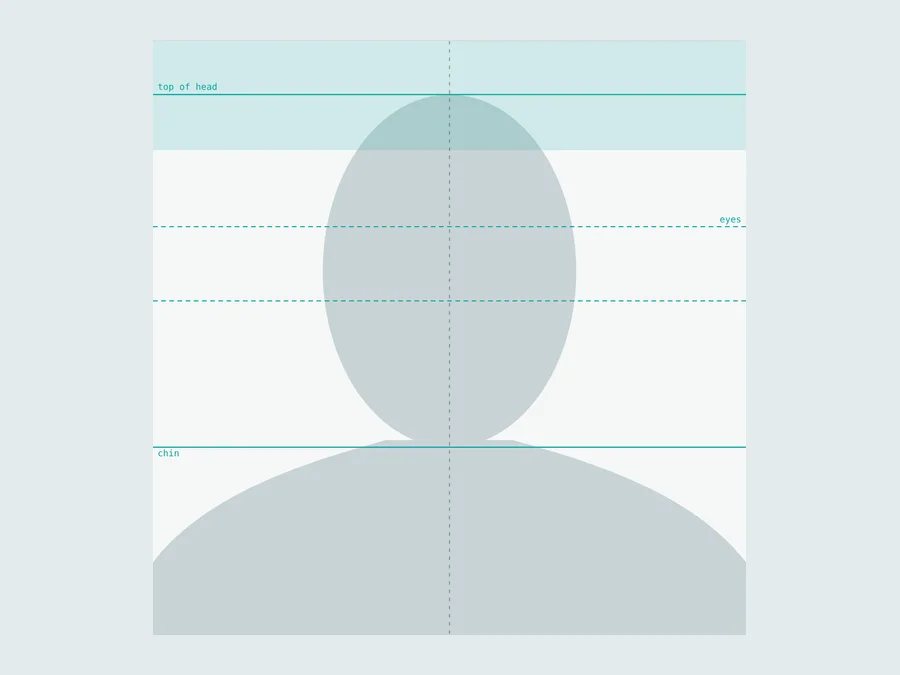
US passport · 2 × 2 in
Head 25–35 mm and eyes 28–35 mm from the bottom.
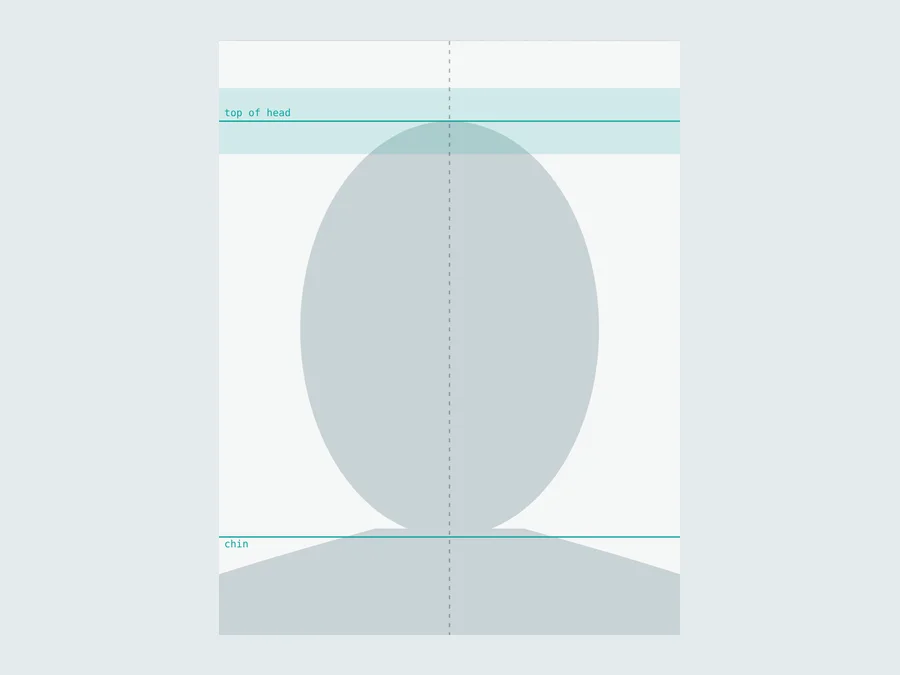
UK passport · 35 × 45 mm
Head 29–34 mm, light grey background.
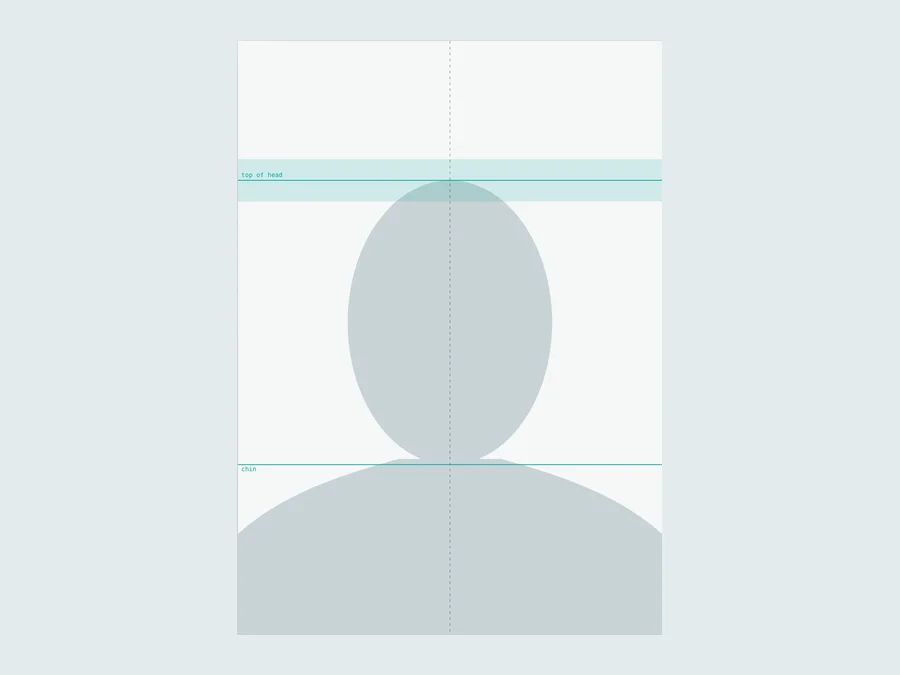
Canada · 50 × 70 mm
Head 31–36 mm from chin to crown.
How to make a passport photo online
Choose your document
Pick the passport or visa you are applying for. The size, head height and background rules load automatically.
Add your photo
Open a photo or take one with your phone. Face the camera with your whole head and the top of your shoulders in the picture.
Let it fit and clean up
The tool finds your face, levels a tilted head, sizes your head to the rules and replaces the background with white or light grey.
Read the checks
Green means a rule is met. Fix anything orange or red by dragging the photo, adjusting the head size or taking a new photo.
Download and print
Save the digital photo for online forms, or a print sheet for 4 × 6 in or 10 × 15 cm photo paper. Print at 100% scale.
Passport photo sizes by country
The head is measured from the bottom of the chin to the top of the head, including hair. These are the published rules the tool uses; check the issuing office before you apply, as rules do change.
| Document | Photo size | Head height | Background | Digital file |
|---|---|---|---|---|
| US passport & visa | 2 × 2 in (51 × 51 mm) | 25–35 mm | White or off-white | 600–1200 px square |
| UK passport | 35 × 45 mm | 29–34 mm | Light grey or cream | 600 dpi JPG |
| Schengen visa & EU passports | 35 × 45 mm | 32–36 mm | White or very light grey | 600 dpi JPG |
| Canadian passport (print) | 50 × 70 mm | 31–36 mm | White or light colour | 600 dpi JPG |
| Australian passport | 35 × 45 mm | 32–36 mm | White or light | 600 dpi JPG |
| Indian passport (ICAO, from Sept 2025) | 35 × 45 mm | Face 80–85% of the photo | White | 630 × 810 px |
| Chinese passport & visa | 33 × 48 mm | 28–33 mm | White | 600 dpi JPG |
What the tool does for you
Automatic head sizing
Finds your face, measures from chin to the top of your hair and scales the photo so your head lands inside the allowed range.
Plain background
Replaces a busy room or wall with white, off-white or light grey, keeping the edges of your hair natural.
Compliance checks
Head size, eye height, centring, head tilt, eyes open, mouth closed, even lighting, resolution and background, each marked pass or warning.
Fine control
Drag the photo, adjust the head size or straighten it by hand, with guide lines that show each rule as you go.
Print sheets
Fits as many copies as possible on 4 × 6 in, 10 × 15 cm, 5 × 7 in, A4 or US Letter, at 300 dpi with cut lines.
Private by design
Everything runs in your browser. Your photo is never uploaded, stored or seen by anyone else.
Tips for taking a passport photo at home
Use soft, even light
Face a window during the day, or a lamp placed straight in front of you. Avoid overhead light and flash, which cast shadows under the eyes and on the background.
Stand in front of a plain wall
A light, plain wall gives the cleanest result, even though the tool replaces the background. Step about half a metre away from it to avoid a shadow behind you.
Ask someone else to take it
Have them hold the camera at your eye level, about 1.2 m (4 ft) away, and zoom in slightly. Selfies at arm's length make the nose look larger and the ears smaller.
Keep a neutral expression
Look straight into the camera with both eyes open and your mouth closed. Keep your head level and your hair away from your eyes.
Remove glasses and hats
Glasses are not allowed for US photos and often cause glare elsewhere. Head coverings are generally allowed only for religious or medical reasons, with the whole face visible.
Wear everyday clothes
Choose a top that contrasts with the background. White clothes can blend into a white background, and uniforms and camouflage are not allowed in US photos.
How to print your passport photos
Choose your paper size in the Download section and save the print sheet. On a 4 × 6 in sheet you get six US photos, and on 10 × 15 cm photo paper you get eight 35 × 45 mm photos.
Order it as a standard 4 × 6 or 10 × 15 print at a pharmacy, supermarket photo kiosk or online photo service, which is usually inexpensive. To print at home, use glossy or matte photo paper and a photo printer.
Always print at 100% scale. Turn off "fit to page", borders and automatic cropping, or the photos will come out the wrong size.
Cut along the thin grey lines with a ruler and a sharp blade or a paper trimmer, and measure one photo before you send it.
Why passport photos get rejected
- The head is too big or too small. The tool measures it and sizes it to the rules for you.
- The background is busy, dark or shadowed. It is replaced with an even white or light grey.
- The head is tilted or turned. A tilt is levelled automatically, and a turned face is flagged so you can retake it.
- Uneven lighting or shadows on the face. The checks compare both sides of your face and warn when one is darker.
- Closed eyes or an open mouth. Both are checked from points the tool finds on your face.
- The photo is blurry or printed at the wrong size. The resolution check warns about small photos, and print sheets are made at an exact 300 dpi.
Your photo stays on your device
Most online passport photo services upload your picture to their servers and charge for the download. Aleynray Ai Passport Photo Maker works differently: the face detector and background model load into your browser and do all the work on your own computer or phone.
The background model downloads once (about 44 MB), so the first photo takes a little longer. After that your browser keeps it.
- Free, with no sign-up or watermark
- Photos never leave your device
- Official sizes for many countries
- Digital file and print sheet
- Works on desktop and mobile
Frequently asked questions
Is the passport photo maker free?
Yes. There is no sign-up, no credits and no watermark. You can download the digital photo and the print sheet as often as you like.
Will my photo be accepted?
The tool sizes and checks your photo against the published rules for the document you choose, and flags common problems such as a head that is too small, closed eyes or uneven light. The final decision always rests with the office that issues your document, so check its latest rules before you apply, especially for glasses, expression and photo age.
Is my photo uploaded anywhere?
No. Face detection, background replacement and the print sheet are all made inside your web browser, on your own device. Your photo is never sent to a server, which matters for an ID photo.
What size is a US passport photo?
A US passport or visa photo is 2 × 2 inches (51 × 51 mm). The head, measured from the chin to the top of the hair, must be 1 to 1⅜ inches (25–35 mm), and the eyes 1⅛ to 1⅜ inches (28–35 mm) from the bottom. Online, the digital photo is a square of 600 to 1200 pixels; the tool exports 1200 × 1200.
Where can I print my passport photos?
Download the print sheet and print it as a standard 4 × 6 inch (10 × 15 cm) photo at a pharmacy, supermarket photo kiosk or online print service, or on photo paper at home. Always print at 100% scale with no "fit to page" or borders, then cut along the grey lines.
Can I use the photo for an online application?
Yes. Download the digital photo, which is saved as a JPG at the official pixel size where one is published (for example 1200 × 1200 for the US and 630 × 810 for India), or at 600 dpi otherwise.
Can I wear glasses in a passport photo?
For US passports and visas, glasses are not allowed. Many other countries allow them only without glare, tint or thick frames that hide the eyes. Taking them off is the safest choice.
Does it work on a phone?
Yes. Use Take photo to open your camera, or choose a photo you already have. Ask someone to take the photo from about 1.2 m (4 ft) away at eye level rather than taking a selfie at arm's length, which distorts the face.
Check the rules, then apply with confidence
Photo rules change from time to time and some offices add their own requirements, such as a recent date or a studio stamp on the back. Confirm the latest rules with the office that issues your document before you submit your photo.