PDF Editor
Edit a PDF right in your browser. Change existing text, sign, fill in forms, add text, images and highlights, and rotate, reorder or merge pages, then download your finished PDF. Free, with no sign-up and no watermark, and your file is never uploaded.
Everything in one editor
What you can do with your PDF
Edit existing text
Click any line, type the new words, and the original text is replaced in the saved file.
Sign PDFs
Draw, type or upload a signature, place it on the line and add today's date.
Fill PDF forms
Type into form fields, tick boxes and choose options, then save a completed copy.
Add text and images
Add notes, labels, logos and photos anywhere on a page in any colour and size.
Annotate
Highlight, draw freehand, add arrows, boxes, circles, check marks and crosses.
Organise pages
Rotate, reorder, delete, insert blank pages and merge in other PDFs or images.
PDF Editor
Open · Edit · Sign · Download
See it in action
An invoice edited with Edit text: the number, the payment terms and the total were changed in place, in the same fonts and colours. Next to it, a form filled in, highlighted and signed.
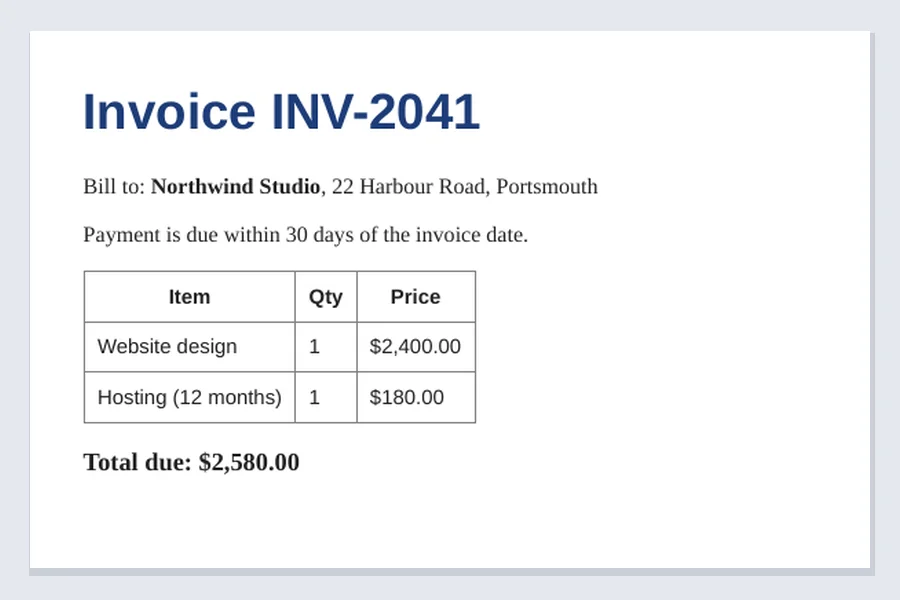
Before
The original invoice.
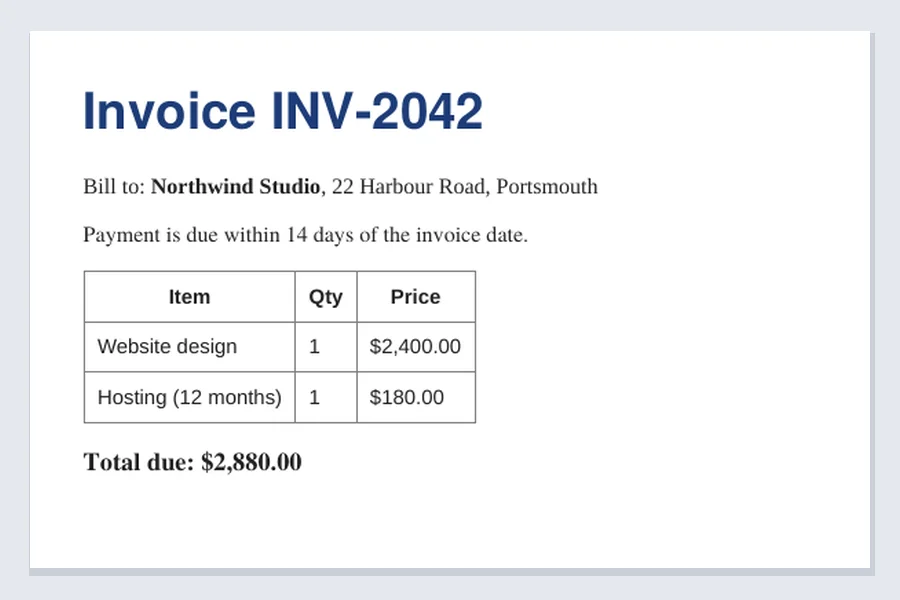
After Edit text
New number, terms and total in the original fonts.
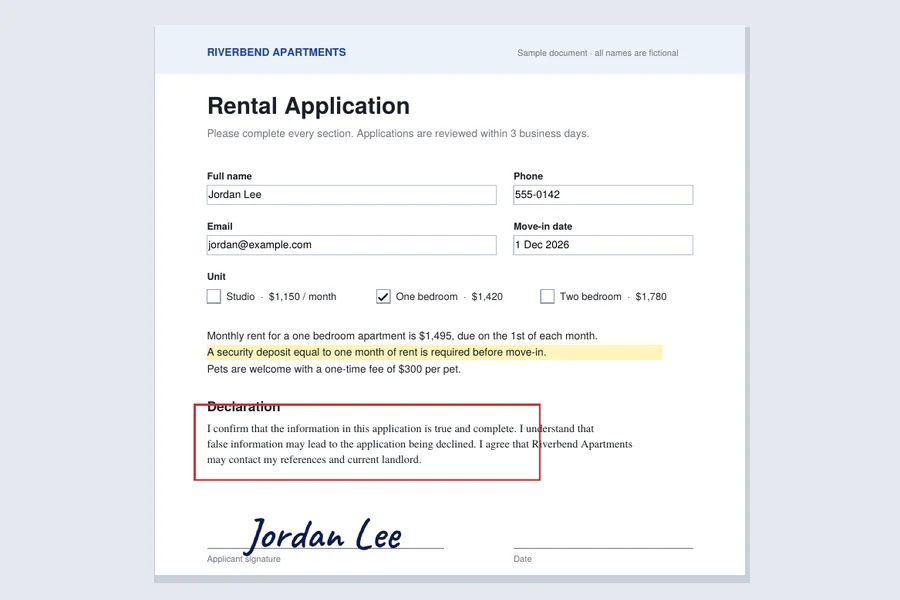
Filled and signed
Form fields, a check box, a highlight and a signature.
How to edit a PDF online
Open your PDF
Click Open PDF or drop a file onto the editor. Password-protected PDFs ask for their password.
Choose a tool
Edit text, Add text, Sign, Image, Draw, Highlight, Whiteout, shapes, check marks or the date.
Make your changes
Click or drag on the page. Select anything you added to move it, resize it or change its colour and font.
Organise the pages
Use the page list to reorder by dragging, rotate, delete, add a blank page, or add pages from another PDF or an image.
Download the PDF
Press Download PDF. Your edited file is saved straight to your device.
Real text editing, not just white boxes
Most free PDF editors "edit" text by drawing a white rectangle over the old words and typing on top. The old text is still in the file: anyone who copies, searches or selects the page finds it, and the white box often shows on coloured backgrounds.
Aleynray Ai PDF Editor works differently. When you click a line, it reads the line's font style, size and colour and the background behind it, and places your new text exactly on the original baseline. When you save, the original words are deleted from the page, while everything around them stays exactly where it was.
Whiteout removes text too. Text under a whiteout box is deleted from the saved file, not just hidden, which makes it useful for removing names, numbers or addresses. Pictures under a whiteout are covered but stay in the file.
Fonts are matched to the closest standard family (Helvetica, Times or Courier) in the same weight and size.
Sign, fill and organise
Sign a PDF
Draw your signature with a mouse, finger or stylus, type your name in one of three handwriting styles, or upload a photo of your signature; the paper background is removed automatically. Your signatures can be remembered on your device for next time.
Fill in PDF forms
Fillable fields are highlighted as soon as the PDF opens. Type answers, tick check boxes, pick options, then download a completed copy. For forms without fields, use Add text and Check.
Organise pages
Drag thumbnails to reorder, rotate pages a quarter turn, delete what you don't need, insert blank pages, and add pages from other PDFs or images to merge them into one file.
Your PDF stays on your device
Online PDF editors usually upload your document to their servers, then limit free use or add a watermark. Aleynray Ai PDF Editor loads the editor into your browser and does everything on your own computer or phone.
Nothing is sent anywhere, so contracts, bank statements, medical forms and ID documents stay private.
- Free, with no sign-up or limits
- No watermark on saved PDFs
- Files never leave your device
- Opens password-protected PDFs
- Works on desktop and mobile
Good to know
Scanned documents
A scanned page is an image, so Edit text has nothing to change. Run it through OCR first, or add text and whiteout on top.
Password-protected PDFs
You can open and view them with the password. To save changes, unlock the PDF first, then edit the unlocked copy.
Compress, convert and more
For compressing, converting, OCR, splitting and other jobs, use our full set of PDF tools.
Undo anything
Every change can be undone and redone, including deleted or rotated pages, until you download.
Frequently asked questions
Is the PDF editor free?
Yes. There is no sign-up, no trial, no page limit and no watermark on the saved file.
Is my PDF uploaded to a server?
No. The PDF is opened, edited and saved inside your web browser, on your own device. That makes Aleynray Ai PDF Editor a safe choice for contracts, invoices, IDs and other private documents.
Can I edit the existing text in a PDF?
Yes. Choose Edit text and click a line. The tool picks up the line's font style, size and colour and puts your new text in its place. When you save, the old words are removed from the file, so copying or searching the PDF finds only your new text.
Will the edited text use exactly the same font?
It uses the closest standard font: Helvetica, Times or Courier, in the same weight, size and colour. Most documents look unchanged, but a decorative or brand font may look slightly different.
How do I sign a PDF?
Choose Sign, then draw your signature, type your name in a handwriting style, or upload a photo of your signature. Place it on the signature line and resize it from the corner. Add the date with the Date tool.
Can I fill in PDF forms?
Yes. Form fields are highlighted when you open the PDF; click one to type, tick check boxes and choose from lists. Fields stay fillable when you only fill in the form, and are made permanent if you also change the pages.
Can I edit a scanned PDF?
A scanned page is a picture, so there is no text to edit directly. You can still add text, whiteout, signatures and highlights on top. To turn a scan into text first, use an OCR tool, then open the result here.
Does it work on phones?
Yes. Open a PDF from your phone, tap Edit text or Add text, and use the Pages button to reorder or rotate pages. Large PDFs open faster on a computer.